New Agent in Microsoft 365: Copilot Cowork in Frontier
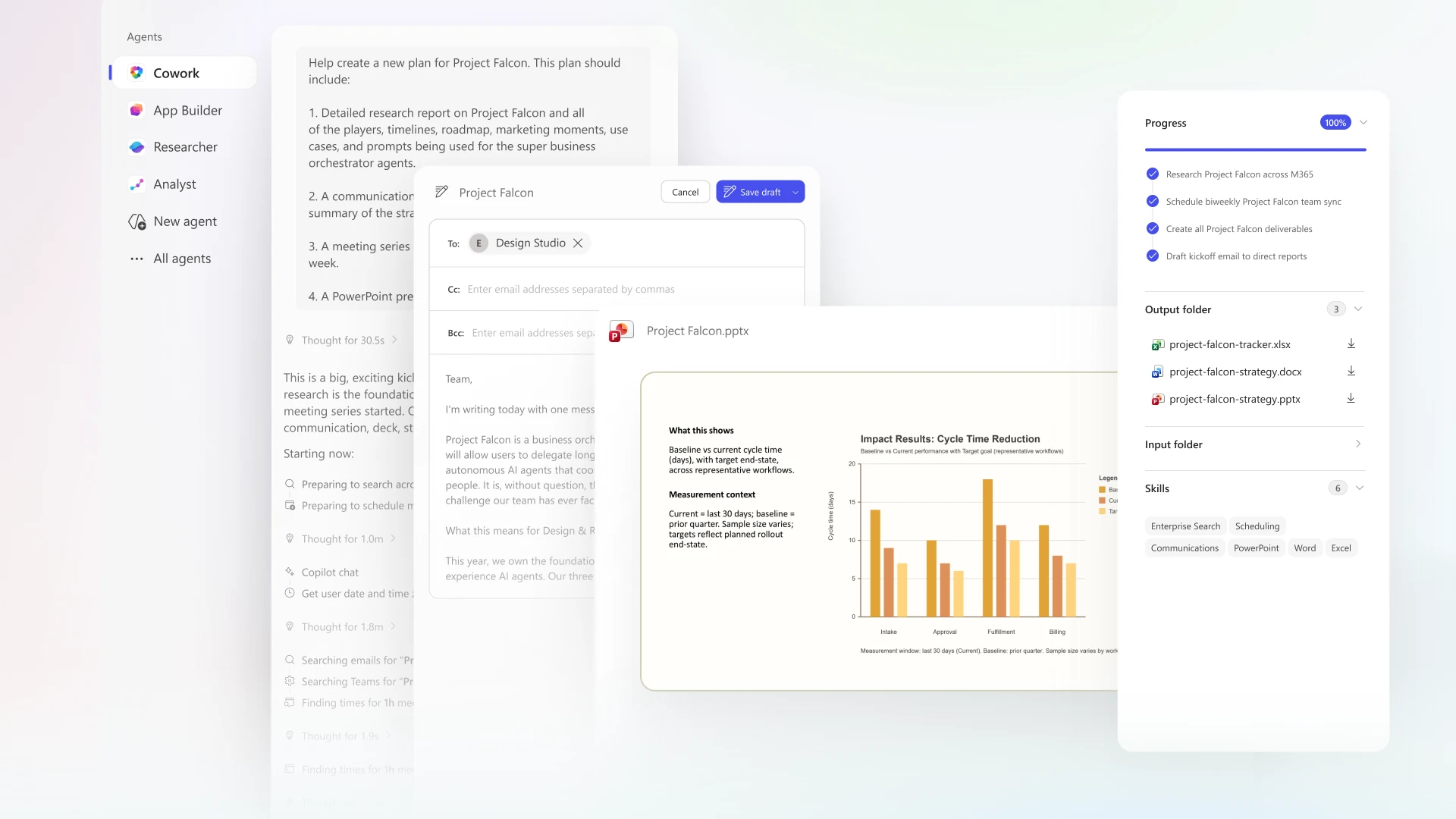
Microsoft's newest Frontier agent story is not just another chatbot. Copilot Cowork moves Microsoft 365 Copilot from answering and drafting toward supervised execution: planning, creating files, scheduling meetings, sending communications, running research, coordinating tasks, and using plugins while staying inside Microsoft 365 security, identity, compliance, and governance boundaries.
Executive Takeaways
Public Microsoft sources point to Copilot Cowork as the practical "agent in M365" now available through Frontier. It is designed for long-running work across Outlook, Teams, Word, Excel, PowerPoint, SharePoint, OneDrive, enterprise search, plugins, and scheduled prompts. The highest business value is a new operating pattern: human-led, agent-operated workflows with review, approval, auditability, and governance.
Visual Analytics
Scores reflect source strength, customer relevance, and practical value for enterprise cloud architecture conversations.
96% confidence: clear Microsoft positioning around Frontier Transformation, M365 E7, Cowork, Work IQ, and Agent 365.
82% confidence: strong value, but Cowork remains Frontier preview and capabilities can change.
94% confidence: directly affects adoption architecture, governance, identity, data controls, and customer workshops.
92% confidence: Agent 365 exists because agent sprawl, shadow AI, oversharing, and tool misuse are real enterprise risks.
Value Proposition
For the business
Cowork reduces the gap between insight and execution. Instead of only generating a recommendation, it can assemble the briefing, schedule the prep, draft the message, create the spreadsheet, produce the deck, post in Teams, and keep the work visible for review.
For IT and security
Agent 365 provides an operating model for agent growth: inventory, ownership, permissions, lifecycle controls, internet/network restrictions, local/cloud agent discovery, policy enforcement, and evidence for audit and compliance.
Capability Matrix
| Capability | What Microsoft says it does | Business value | Architecture implication | Confidence |
|---|---|---|---|---|
| Copilot Cowork | Plans and carries out tasks across Microsoft 365: email, meetings, documents, Teams posts, enterprise search, research, scheduling, and recurring prompts. | Moves from chat to accountable work execution. | Requires readiness across identity, permissions, SharePoint/OneDrive hygiene, Teams/Exchange controls, and adoption policy. | 96% Direct Learn and Microsoft blog support. |
| Frontier access | Early access path for latest AI innovations, including Cowork and multi-model capabilities. | Lets advanced customers shape, test, and learn before broad release. | Needs preview governance, pilot cohort selection, support boundaries, and clear success metrics. | 90% Frontier program referenced repeatedly; access page requires sign-in. |
| Work IQ grounding | Uses Microsoft 365 work context across files, meetings, chats, relationships, and signals. | Improves relevance and reduces cold-start work. | Data quality, semantic access, permission hygiene, and sensitivity labeling become adoption prerequisites. | 94% Repeated across Microsoft 365 Copilot sources. |
| App and plugin ecosystem | Agents can bring Adobe, Figma, Box, Coursera, Miro, monday.com, Dynamics 365, Power Apps, and other app experiences into Copilot chat. | Reduces context switching and turns Copilot conversations into business process entry points. | Requires approved agent/app catalog, data flow review, admin deployment, and connector lifecycle management. | 92% Direct app agent article support. |
| Agent 365 | Control plane to observe, govern, and secure agents and interactions across Microsoft and ecosystem agents. | Makes agent adoption operable at enterprise scale. | Connects M365 admin center, Defender, Entra, Purview, Intune, registry, policies, and lifecycle governance. | 96% Direct GA blog support. |
| Inception label | No public Microsoft source located in this pass that brands this M365 Frontier agent as "Inception." | Use internally only until customer-facing naming is confirmed. | In customer conversations, lead with public names: Microsoft 365 Copilot Cowork, Frontier, Agent 365, and Microsoft 365 E7. | 78% Based on targeted public-source search; internal/codename material may differ. |
High-Value Use Cases
Executive briefing
Gather meeting history, files, CRM or partner context, open issues, and next-step recommendations into a briefing packet and follow-up draft.
Customer research
Synthesize public sources and enterprise documents into cited memos, Excel workbooks, and ready-to-send summaries.
Launch planning
Build competitive intel, value proposition drafts, customer pitch decks, milestones, owners, and team communications.
Calendar and focus management
Identify conflicts, reschedule meetings, add focus blocks, decline low-value meetings with context, and prepare meeting materials.
Operational updates
Post Teams updates, send stakeholder emails, create newsletters, maintain status documents, and package decisions.
Process agents
Connect approved business apps into Copilot so teams can update records, approve requests, create assets, and act in context.
Governance discovery
Use Agent 365 to inventory local, SaaS, Copilot Studio, Foundry, and ecosystem agents and assign owners.
Risk reduction
Apply least privilege, data protection, audit, lifecycle policies, network controls, and shadow AI detection to agent adoption.
How This Helps Principal Cloud Solution Architects
| PCSA responsibility | How Cowork/Frontier helps | Recommended motion | Proof point to collect |
|---|---|---|---|
| Customer AI strategy | Shifts discussion from generic productivity to measurable agent-operated workflows. | Run a Frontier readiness workshop tied to 3 to 5 executive workflows. | Hours saved, cycle-time reduction, stakeholder satisfaction, decision quality. |
| Architecture governance | Creates a need for integrated identity, data, compliance, and agent lifecycle architecture. | Map Cowork, Agent 365, M365 E7, Defender, Entra, Purview, Intune, SharePoint, and Copilot Studio. | Governed agent inventory, policy coverage, access review completion. |
| Adoption and change | Makes delegation patterns concrete: what humans own, what agents execute, and when approvals are required. | Define role-based use cases for sellers, executives, operations, architects, finance, and support teams. | Active usage, repeat tasks delegated, approved actions, avoided manual rework. |
| Security and risk | Agent 365 gives PCSAs a control-plane story for customers worried about shadow AI and tool misuse. | Start with agent inventory, permissions, data classification, internet controls, and incident response paths. | Reduced unmanaged agents, blocked risky paths, audit-ready evidence. |
| Platform extensibility | App agents, MCP Apps, Apps SDK, Copilot Studio, and plugins create a path from M365 productivity to business process automation. | Identify top line-of-business systems that should surface in Copilot conversations. | Approved app/agent catalog, connected workflows, reduction in context switching. |
How It Helps Customers
Customer benefits
Faster executionFewer tool switchesBetter reuse of work dataGoverned scale
Customers can move from isolated prompts to coordinated workflows that produce files, messages, meetings, research, and operational updates while staying in Microsoft 365. The customer value is not only productivity; it is a repeatable operating model for work.
Customer cautions
Preview varianceData hygiene dependencyGovernance requiredChange management
Early adoption needs careful scoping. Customers should avoid treating Cowork as unrestricted automation. Start with supervised workflows, explicit approval paths, least privilege, and source-of-truth decisions for documents and records.
Pros, Cons, and Decision Guidance
| Area | Pros | Cons or risks | Decision guidance |
|---|---|---|---|
| Productivity | Long-running work, file creation, communications, research, calendar actions, and recurring tasks. | Bad prompts, weak source data, or unclear ownership can create low-quality outputs. | Use templates, approval steps, and outcome metrics. |
| Enterprise trust | Microsoft 365 permissions, labels, audit, data protection, Agent 365 governance, and admin/security integration. | Governance must be designed before broad rollout; shadow agents can still emerge outside approved channels. | Pair Cowork pilots with Agent 365 inventory and control-plane setup. |
| Adoption | Natural fit for knowledge workers because it operates inside daily work tools. | Users need to learn delegation patterns, not just prompting. | Train by scenario: customer prep, weekly review, launch plan, incident summary. |
| Extensibility | Plugins, app agents, MCP Apps, Apps SDK, Copilot Studio, Dynamics 365, Power Apps, and partner apps. | Integration catalog can sprawl without ownership and quality controls. | Create an approved agent/app intake and certification path. |
| Availability | Frontier gives early access and learning advantage. | Preview features may change and can have restricted functionality. | Use pilots for learning, not mission-critical commitments until GA scope is confirmed. |
Recommended PCSA Customer Motion
1. Qualify
Identify customers already licensed for Copilot, evaluating M365 E7, or asking about agent governance, shadow AI, and productivity transformation.
2. Select workflow
Pick a high-friction, high-frequency workflow: executive prep, account planning, monthly review, launch planning, or operational status reporting.
3. Establish controls
Set permission hygiene, sensitivity labels, SharePoint/OneDrive governance, approved plugins, action approval policy, and Agent 365 ownership.
4. Measure
Track elapsed time, manual touchpoints, rework, source quality, approval exceptions, user satisfaction, and governance coverage.
References and Source Notes
- Microsoft Learn: Cowork overview (Frontier) - prerelease documentation for Cowork capabilities, skills, action approval, control, and availability.
- Microsoft 365 Blog: Copilot Cowork now available in Frontier - Frontier availability, Cowork value, Researcher Critique, model Council, and customer quote.
- Microsoft 365 Blog: Copilot Cowork, a new way of getting work done - delegation, plans, checkpoints, customer meeting prep, research, launch planning, and enterprise controls.
- Microsoft 365 Blog: Powering Frontier Transformation with Copilot and agents - Wave 3, Cowork, agents in chat, multi-model intelligence, Agent 365, Microsoft 365 E7, and Frontier Transformation.
- Microsoft 365 Blog: Microsoft 365 Copilot, human agency, and the opportunity for every organization - human agency, Work Trend Index framing, Frontier Professionals, leadership operating model, and Agent 365 control plane.
- Microsoft 365 Blog: Bring your everyday business apps into the flow of work with agents in Microsoft 365 Copilot - app agents, Agent Store examples, MCP Apps, Apps SDK, and in-chat execution.
- Microsoft Security Blog: Microsoft Agent 365 generally available - Agent 365 governance, observability, shadow AI, local/cloud/SaaS agents, Defender, Intune, Entra, and partner ecosystem.